Find Nearby Cell Towers &
Improve Your Mobile Signal

Accurate cell tower maps, real-time signal measurements, and coverage insights for all major carriers.


4.5
Rating
4.1K+
Reviews
1M+
Users Worldwide
50M+
Towers Database
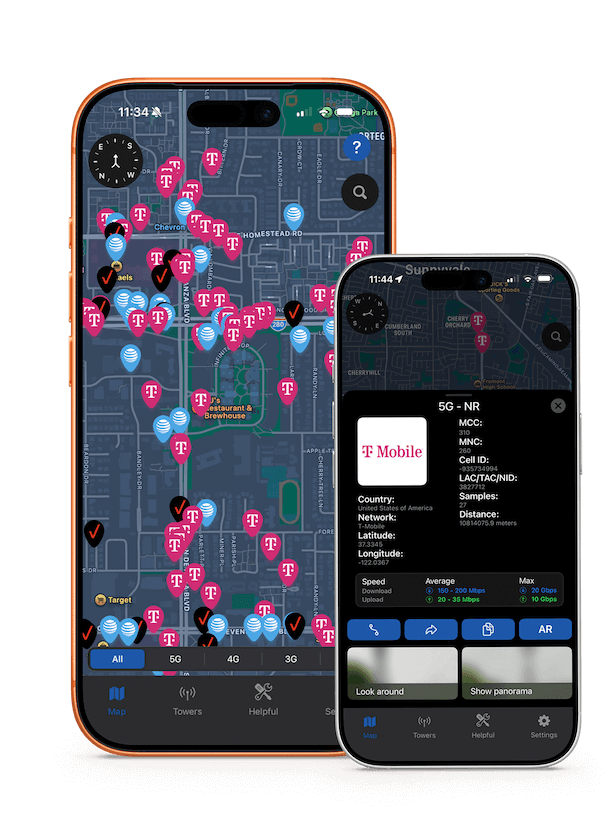
Cell tower locator app showing 5G 4G LTE tower map with signal strength indicators and coverage map

Problems We Solve

Our app helps you overcome common connectivity challenges

wifi_off

No WiFi Available

When WiFi is unavailable or unreliable, find the best cellular signal to stay connected. Locate nearby towers to ensure stable mobile internet access.

location_on

Find Nearest Cell Tower

Locate the closest cellular tower to improve your signal strength. Get precise directions and distance information to optimize your connection quality.

explore

Signal Booster Direction

Find the exact direction to point your cellular signal booster antenna. Use AR mode to align your booster for maximum signal reception and improved coverage.

compare_arrows

Find Best Carrier

Compare cellular operators in your area to find the best service provider. Make informed decisions when purchasing a new SIM card based on real coverage data.

Powerful Features

Everything you need to optimize your mobile network experience

cell_tower

Cell Tower Locator

View real-time data on nearby mobile towers to determine the best position for a stable connection. Find 5G, 4G/LTE, and 3G towers with precise location information.

signal_cellular_alt

Signal Optimization

When Wi-Fi is unavailable, find the strongest cellular signal areas and nearest cell towers to ensure stable connection. Optimize call quality and data speed by locating the best signal coverage.

filter_alt

Network Type Filtering

Filter towers by network type including 5G, 4G/LTE, and 3G. Easily identify and connect to the best available network based on real-time tower locations and coverage data.

storage

50M+ Towers Database

Access our comprehensive database of over 50 million cellular towers worldwide. Get accurate, up-to-date information about tower locations, operators, and network types.

speed

Internet Speed Test

Measure your internet connection speed in real-time. Test download and upload speeds to find the best network performance in your area.

near_me

Find Nearest Tower & Best Operator

Locate the closest cellular tower and discover the best cellular operator in your radius. Get detailed information about signal strength and coverage quality for each provider.

view_in_ar

AR Mode & Street View

Use augmented reality to locate towers in real-time. View towers on street view panoramas to see their exact location and surrounding area before you arrive.

insights

Connection Stability Insights

Understand network strength and performance to optimize call quality and data speed with detailed analytics and insights.

Supported Carriers

Comprehensive coverage data for major US cellular operators

AT&T

AT&T

Verizon

Verizon

T-Mobile

T-Mobile

Sprint

Sprint

US Cellular

US Cellular

And Many More...

For Whom This App

Designed for everyone who needs reliable mobile connectivity

flight

For Travelers

Find the best cellular coverage when traveling. Locate towers in new areas to ensure you stay connected during your journey.

signal_cellular_connected_no_internet_4_bar

Poor Signal Areas

Struggling with weak signal? Find the nearest tower and optimize your connection to improve call quality and data speed.

work

Remote Workers

Ensure stable internet connection for remote work. Find the best signal location for video calls and data-intensive tasks.

analytics

Coverage Measurement

Measure and analyze network coverage in your area. Get detailed insights about signal strength and network performance.

engineering

Engineers & Technicians

Professional tools for network analysis and tower location. Perfect for technicians installing signal boosters and network engineers.

What Users Say

Join over 1 million satisfied users worldwide who improved their network experience

Gregory D.

"The program indicates Cellular Booster so I thought the app would determine the closest tower to improve AT&T Wireless performance. Very useful for finding signal strength!"

Sarah M.

"Great app for finding cell towers! The AR mode is amazing and helps me find the best signal when I'm traveling. The 50M+ tower database is impressive. Highly recommend!"

Mike T.

"Perfect for outdoor activities. The tower locator feature is accurate and the interface is clean and easy to use. Worth the download!"

Jennifer L.

"The network optimization features really work! I've noticed better signal strength and faster data speeds. The speed test feature helps me find the best operator in my area."

David K.

"Excellent tool for anyone who needs reliable cell service. The 5G tower mapping is particularly useful. Great app overall!"

Emma R.

"Love the AR mode and street view features! Being able to see towers on panoramas before visiting is incredibly useful. The app is well-designed and performs great."

Frequently Asked Questions

Everything you need to know about Cellular Tower Signal Finder

Simply open the app and allow location access. The app will automatically display all nearby cell towers on an interactive map. You can see the distance, signal strength, and network type (5G, 4G, 3G) for each tower. Use the filter feature to find towers by specific network types.

Yes! The app helps you find the best location for optimal signal strength. By locating the nearest tower and understanding signal direction, you can position yourself or your signal booster antenna for maximum reception. The AR mode is particularly useful for aligning signal boosters.

Our app uses a comprehensive database of over 50 million cell towers worldwide, combined with real-time signal measurements from your device. Tower locations are accurate to within a few meters, and signal strength readings are updated in real-time based on your current position.

The app uses a combination of public tower databases, regulatory filings, and crowd-sourced data from millions of users worldwide. Our database is continuously updated to ensure accuracy and includes information about tower locations, operators, network types, and coverage areas.

MCC (Mobile Country Code) is a unique three-digit country code used in mobile networks. It serves to identify the country of the mobile network operator and is used in conjunction with the mobile network operator's code (MNC) to create a unique network identifier.

MNC (Mobile Network Code) is a unique code for a mobile network operator within a country. Together with MCC, it forms a unique identifier for each mobile network. The MNC consists of 2-3 digits and allows for the identification of the operator within a single country.

LAC (Location Area Code) is used in GSM and UMTS networks and represents an identifier defining a group of base stations forming a service area in the network. It allows the system to track subscriber locations.

TAC (Tracking Area Code) is used in LTE networks for similar purposes as LAC in older technologies, identifying a group of cells for tracking a device.

NID (Network ID) is used in CDMA networks and denotes a unique network identifier within a certain area.

Samples in the context of cell towers refer to data or measurements collected from cell towers and mobile devices. These data may include information on signal strength, connection quality, network load, and other parameters. They are used for analyzing and improving network performance, planning network expansion, and optimizing coverage.

TADIG (Transferred Account Data Interchange Group) is an international standard for mobile roaming data exchange between operators. The TADIG code is used to identify operators in the exchange of billing and service usage data in roaming, ensuring the correct calculation of service costs and their billing between operators.

Dynamic Spectrum Sharing (DSS): Some mobile operators use Dynamic Spectrum Sharing technology, allowing the same frequency bands for both 4G and 5G networks. This means your device can receive a 5G signal from a tower officially registered as 4G/LTE, as DSS enables operators to efficiently allocate the spectrum to provide both 4G and 5G services without the need for complete reinstallation or new equipment.

Using Existing Infrastructure: Many operators deploy 5G by upgrading existing 4G/LTE towers with new equipment. In such cases, a tower might not be marked as 5G on the map, even if it provides 5G coverage, because operators can update the tower's equipment to support 5G using the existing infrastructure, allowing for faster and more efficient 5G network deployment.

Low-Power Nodes and Femtocells: To improve coverage and capacity inside buildings and in dense urban areas, 5G networks use low-power nodes and femtocells, which may not be as noticeable on public tower maps. These low-power stations can provide 5G signal in a limited area and might not be listed in the database as separate 5G towers due to their scale and deployment method.

These are different generations and technologies of mobile networks, each with their own technical names:

5G (NR - New Radio): The latest generation of mobile networks, providing the fastest speeds and lowest latency. NR stands for "New Radio" and refers to the 5G radio access technology.

4G (LTE - Long Term Evolution): The fourth generation of mobile networks, offering high-speed internet. LTE is the technical standard for 4G networks that most carriers use today.

3G (UMTS - Universal Mobile Telecommunications System): The third generation of mobile networks, providing basic data services. UMTS is the 3G standard used by most GSM-based carriers.

You may also see other technologies like GSM (2G - Global System for Mobile Communications) or CDMA (Code Division Multiple Access) depending on your carrier. The app displays both the generation number (5G, 4G, 3G) and the technical standard name (NR, LTE, UMTS) to help you better understand what type of network you're connecting to.

Ready to Improve Your Signal?

Download Cellular Tower Signal Finder today and experience better connectivity